New Release The Lawnmower Man Directors Cut
The Lawnmower Man Director’s Cut brought up the debate once more regarding the collision of cinema and technology upon release. The film, which is known… ( Read More )

Where Creativity Meets Technology
Where Creativity Meets Technology

Cooling systems are essential in computers and electronic devices because heat negatively impacts hardware performance, efficiency, and lifespan. Without proper cooling, hardware can overheat, slow… ( Read More )

What is a CPU? The Central Processing Unit (CPU) is the main chip in a computer that executes instructions and performs calculations. It’s often called… ( Read More )
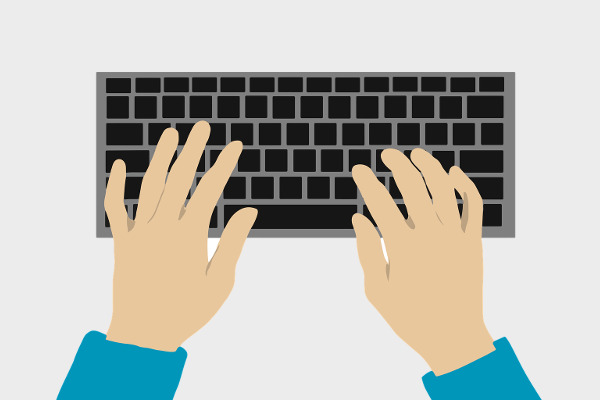
Input and output devices are hardware components that allow communication between the user and the computer system. Input Devices: Used to send data to the… ( Read More )
The Lawnmower Man Director’s Cut brought up the debate once more regarding the collision of cinema and technology upon release. The film, which is known… ( Read More )
With more and more complex networks, administrators experience more and more difficulties with keeping track of the performance, bottlenecks, and data flow security. Packet Trap,… ( Read More )
Technology discourse works best when it is a mixture of technical knowledge and commentary that is easy to relate to. Just The Tech Episode 3… ( Read More )
In the current online environment, it is important to be acquainted with the newest content. Feeds, be it RSS or Atom, are an influential tool… ( Read More )

An Operating System (OS) is system software that acts as a bridge between the computer hardware and the user. It manages hardware resources and provides… ( Read More )
System software is designed to operate, control, and extend the processing capabilities of the computer itself. It acts as a bridge between hardware and user-level… ( Read More )
Product labels can lose adhesion, fade, wrinkle, or become unreadable while the equipment they identify is still in service. Testing described by UL Solutions examines permanence through exposure to conditions such as humidity, water, elevated temperature, sunlight, and chemicals, followed by checks for adhesion, legibility, and physical damage.
A reliable durable product identification process therefore starts before the first label is printed. Manufacturers need to define the product surface, expected service life, application temperature, and likely exposure to abrasion, moisture, ultraviolet light, cleaners, oils, or other substances. These requirements create a practical bridge between the operating environment and the hardware and software selected to produce the marking.
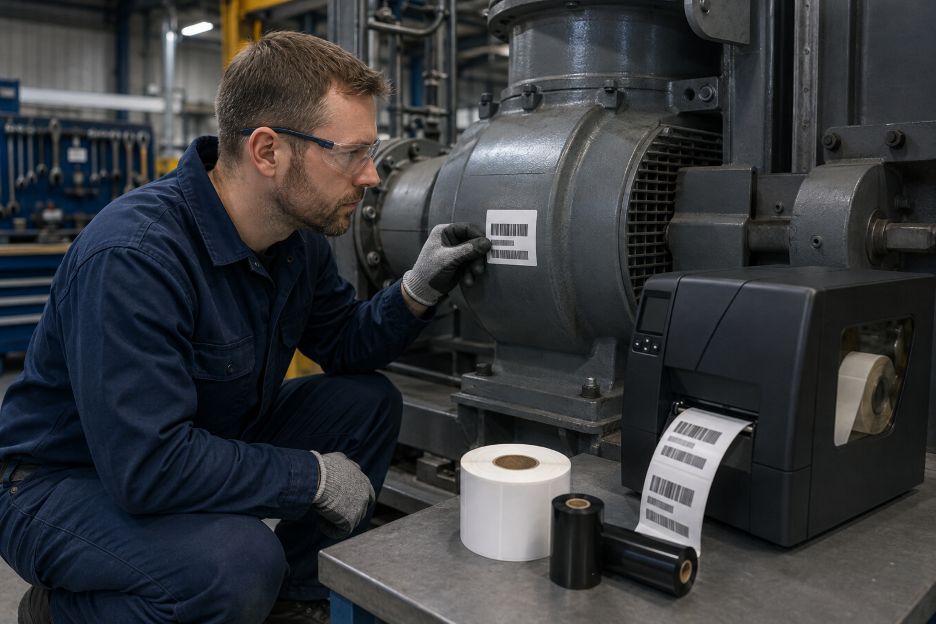
A label is a layered system rather than a single sheet. Facestock carries the printed image, adhesive bonds it to the product, and the ink or thermal-transfer ribbon forms the visible information. UL Solutions explains that ANSI/UL 969 evaluates labels as complete systems because performance depends on the interaction among the label stock, printing material, surface, and conditions of use.
This systems view explains why a strong adhesive alone cannot guarantee longevity. A paper face may absorb moisture, an unsuitable ribbon may rub away, or a label designed for smooth metal may lift from textured plastic. Guidance from Avery Dennison notes that adhesion can vary by substrate and should be tested against expected temperature, humidity, chemical, and ultraviolet exposure.
Printer choice sets the foundation for image durability. Direct thermal equipment forms an image on heat-sensitive media, while thermal-transfer equipment heats a ribbon and transfers its colorant to the label. Zebra Technologies identifies thermal transfer as the longer-lasting option for uses such as asset tags and certification labels, provided that the ribbon and media are properly matched.
The ribbon formulation also changes performance. Wax ribbons generally suit coated paper and ordinary handling, while wax-resin and resin formulations are intended for progressively more demanding resistance needs. Zebra Technologies groups thermal-transfer ribbons into wax, wax-resin, and resin options and stresses matching the formulation to the label material and application.
Facestock and adhesive must then fit the physical product. Synthetic films can offer better resistance to moisture, chemicals, and abrasion than ordinary paper. Adhesive selection should consider whether the surface is metal, glass, painted material, or a low-surface-energy plastic.
Some environments demand evidence beyond a supplier description. Avery Dennison summarizes BS 5609 testing for marine labels, including weathering, temperature cycling, seawater immersion, abrasion, salt spray, and print permanence. For regulated products, the chosen construction should be evaluated against the standard and end-use conditions that actually apply.
Software and the computer’s processor work together to turn a template into printer instructions. Readers seeking background on how CPUs work can see how processors execute instructions and calculations. The label application then controls dimensions, margins, fonts, warning symbols, barcodes, variable-data fields, and the layout assigned to each media size.
Templates should be locked to the printer’s native resolution and actual label size. Images that are scaled unexpectedly can produce soft edges, narrow text, or distorted codes. Barcode data should also be generated in the required symbology rather than inserted as an ordinary graphic. GS1 explains that barcodes encode identifiers in symbols designed for electronic scanning, so the data structure and printed form must work together.
Driver settings are equally important. Heat, speed, media type, and print mode influence how well colorant transfers. Documentation from Zebra Technologies states that print quality depends on printhead heat, printing speed, and loaded media. Excess darkness can blur an image or interfere with barcode scanning, while reducing speed can improve output when the initial result is weak.
A useful qualification process begins with representative products, not a clean laboratory panel alone. Teams can print test labels with the final template, approved ribbon, production printer, and documented settings. Samples should be applied using the normal cleaning method and then exposed to realistic handling, temperature changes, liquids, sunlight, and abrasion. Barcode scans and visual inspections can be recorded at planned intervals.
Version control completes the process. Each approved template should identify the printer model, resolution, stock, ribbon or ink, darkness, speed, and revision date. If any element changes, the combination should be reviewed again. This approach reflects UL Solutions guidance that conditions of acceptability may specify application surfaces, temperature ratings, print colors, label sizes, and exposure limits.
Long-lived identification comes from alignment. Hardware supplies the physical resistance, while software preserves the layout and controls how the image is produced reliably and consistently. By defining the environment, selecting compatible components, controlling templates and settings, and testing the finished result, manufacturers can create labels that remain attached, legible, and useful throughout the intended product life.
 Starting a Reddit account for software and hardware discussions can look easy at first. You sign up, join a few communities, and expect to post right away. In reality, many subreddits have limits tied to account age, karma, or email verification. Reddit’s own help pages explain that some communities restrict posting based on account age, karma, and whether your email is verified. Reddit also notes that karma comes from upvotes and downvotes on your posts and comments, and each community has its own rules on top of Reddit-wide rules.
That is why “warming up” a Reddit account should never mean trying to game the platform. A good warm-up guide for Reddit accounts process means building a real presence. It means reading community rules, joining relevant spaces, and making useful comments before you start publishing your own links or opinions. This matters even more in software and hardware communities, where users can quickly spot low-effort content, copied advice, and self-promotion. If your goal is to build trust, the best start is to act like a real member because that is exactly what Reddit expects.
The first step is choosing the right communities. In the software and hardware space, that can include subreddits about PC building, coding, programming languages, laptops, Linux, Windows, cybersecurity, gadgets, and troubleshooting. Do not join dozens of random communities on day one. Pick a small set that truly matches your interest or expertise. This helps you understand how people talk, what kind of posts perform well, and what the moderators allow.
Spend your first few days reading before posting. Look at the top posts from the week and month. Open comment sections and study what kind of replies get upvotes. You will notice that strong comments are often direct, specific, and useful. In software communities, people appreciate answers that solve a problem. In hardware communities, users respond well to real experience, clear specs, and practical buying or setup advice. This early reading phase helps you avoid sounding out of place.
You should also verify your email early. Reddit says that email verification can affect whether you meet posting requirements in some communities. A basic step like this can remove avoidable friction later. If you skip it, you may wonder why your post is blocked even when your content is fine.
Once your account is set up, begin with comments instead of posts. Comments are a safer way to build a history. They also help you earn karma in a natural way. Reddit explains that karma reflects how other users vote on your contributions. That means helpful comments can gradually increase your standing.
In software and hardware threads, simple comment ideas work well. You can answer beginner questions, share a short tip from personal experience, recommend a tool you actually use, or explain a mistake you learned from. For example, if someone asks why a laptop is overheating, a practical comment about dust buildup, fan settings, and safe cleaning can be more useful than a vague reply. If someone asks which code editor feels lighter on older machines, an honest comparison based on your own use can add value without sounding forced.
A warm account is not just an old account. It is an account with signs of normal, helpful activity. That means your profile should show steady engagement over time. You do not need to post every hour. In fact, that can look unnatural. A better pattern is to comment regularly, join real discussions, and avoid dropping links too early. Reddit warns that accounts can be flagged for spam or inauthentic activity.
When you are ready to make your first posts, keep them community-first. Do not lead with self-promotion. In software and hardware communities, a good first post could be a setup question, a benchmark discussion, a troubleshooting issue, or a before-and-after build story. These are easier for communities to accept because they invite discussion. Reddit also advises users to choose a relevant community and follow that community’s posting rules and format requirements.
Titles matter a lot. A clear title gets more attention than a vague one. “Need help choosing RAM for a Ryzen 7 build” is better than “Please help.” In software discussions, “Why is my Python script slowing down with large CSV files?” is better than “Code issue.” Specific titles help the right people notice your post. They also show that you respect the reader’s time.
Timing matters too, but content quality matters more. Some users obsess over the perfect hour to post. That can help a little, but it cannot save weak content. A useful post in the right subreddit will usually do better than a generic post at the perfect time. Reddit itself says there is no guaranteed way to get noticed, but relevance and knowing your audience improve your chances.
Another smart move is to avoid arguments early on. Tech communities can be opinionated. People debate brands, operating systems, programming tools, and security practices all the time. You do not need to agree with everyone, but a new account benefits from being calm and constructive. If you sound defensive or aggressive, people may ignore your point even if it is correct. A respectful tone helps your account look reliable.
The best long-term strategy is simple. Be useful often. In software and hardware communities, usefulness is easy to recognize. Solve small problems. Ask thoughtful questions. Share real results. Explain why one option may suit a beginner better than another. Over time, this creates trust.
It also helps to spread your activity across comments and posts. If your account only appears when you want traffic, users will notice. If you only post links, moderators may remove your content. A healthy account mix looks more natural. It shows curiosity, not just promotion.
You should also expect that some communities may still limit you. Reddit’s eligibility system can stop posting if an account does not meet a subreddit’s minimum criteria for age, karma, or email verification. That does not mean your account is bad. It often just means you need more time and more real participation.
For software and hardware niches, patience pays off. These audiences value accuracy and honesty. They are often open to newcomers, but they usually reject shortcuts. A well-warmed Reddit account is not built through tricks. It is built through steady participation, relevant comments, and respect for each community’s culture. If you follow that path, your posts are more likely to be seen, your comments are more likely to be upvoted, and your account will have a stronger foundation for the long run.
Learning about Accely SAP S/4HANA partner expertise begins with a shift in perspective. ERP systems are often discussed at the application level, modules, workflows, and business processes, but these elements represent only the visible layer of a much deeper technology stack. Beneath SAP’s interface lies a complex foundation of servers, processors, memory, storage, and network infrastructure. Expert SAP partners understand ERP not as isolated software, but as a system where application logic and hardware resources operate as a unified whole.
This full-stack view is essential in enterprise environments where performance, reliability, and scalability are non-negotiable. SAP partners with true expertise analyze how each layer of the stack contributes to system behavior, ensuring that technical decisions align with operational demands.
At the core of SAP performance is the relationship between software design and hardware capability. Transaction processing, reporting, and analytics all place distinct demands on computing resources. Expert SAP partners assess these workloads and align them with appropriate hardware architectures, whether on-premise or in the cloud.
Processor selection affects parallel processing and user concurrency. Memory architecture determines how efficiently data can be cached and accessed. Storage speed influences transaction throughput and reporting responsiveness.
By understanding these interactions, SAP partners design systems that avoid bottlenecks and deliver consistent performance under real-world conditions.
Modern SAP environments span a range of infrastructure models. Some enterprises rely on dedicated physical servers, others operate in virtualized environments, and many adopt hybrid or fully cloud-based deployments. Each model introduces different performance characteristics and constraints.
SAP partner experts evaluate infrastructure choices by considering workload elasticity, high availability requirements, and disaster recovery strategies. In cloud scenarios, this includes selecting appropriate instance types, storage tiers, and network configurations. The goal is not simply to deploy SAP, but to ensure it operates efficiently within its chosen infrastructure context.

Mission-critical ERP systems must remain available and responsive, even under peak load or during infrastructure disruptions. Expert SAP partners design for resilience by aligning software architecture with redundant hardware configurations and failover mechanisms.
High availability clusters, load balancing, and backup strategies are integrated into the stack from the outset. Scalability is treated as an architectural principle rather than a reactive measure. As transaction volumes grow or new users are added, the system can scale without compromising stability. This holistic approach reflects an understanding that ERP reliability is achieved through coordinated software and hardware design.
The defining trait of an SAP partner expert is the ability to think like a system architect. Rather than focusing solely on configuration or customization, these partners bridge the gap between enterprise software and the hardware environments that power it. They translate business requirements into technical designs that account for processing capacity, memory utilization, and infrastructure constraints.
Exploring SAP partner expertise across software and hardware reveals the depth required to support enterprise operations. True expertise lies in understanding how every layer of the stack interacts to produce performance, reliability, and scalability. By approaching ERP as a unified system, SAP partner experts deliver solutions that are not only functional, but engineered to perform under the demands of modern enterprise environments.
 Technology runs our daily lives in ways we often forget. Every task we do on a screen depends on two things: software and hardware. These two parts may seem different, but they work together to make your devices fast, reliable, and easy to use. Whether you browse the internet, create content, or play games, both software and hardware have a big role in the experience.
At the same time, many people use Reddit as part of their daily routine. It is where users read news, share stories, and join communities. But some encounter a problem: suddenly not being able to post or comment. When this happens, the first thought is often, “Am I banned?”
The good news is you can check Reddit ban for free here, and it only takes a few steps.
Hardware refers to the physical parts of any device. It includes your computer, phone, tablet, and even accessories. These items are the foundation of everything you do online or offline. Without hardware, software has nothing to run on.
Here are the most common types of hardware:
Good hardware can improve your entire experience. A faster processor, more RAM, or an SSD can speed up work and reduce loading times. Even a simple hardware upgrade can make an old device feel new.
Software refers to the programs and systems that run on your device. Apps, websites, browsers, games, and operating systems are all software. They send commands to the hardware so the device knows what to do.
Types of software include:
Good software can help your device stay secure and efficient. It also affects speed, performance, and stability. Updates are also important because they fix bugs and improve features. When software and hardware work well together, the results are smooth, fast, and reliable.
Many device problems come from poor compatibility. This happens when the software is too new or too heavy for your hardware. It also happens when the hardware is outdated and cannot support new features. When the two do not match, you may see slow performance, lag, or app crashes.
Here are simple signs that the hardware and software are mismatched:
Upgrading either side can fix these issues. A RAM upgrade, new storage, or updated software can improve performance. In other cases, replacing old hardware may be the only option. Many users also benefit from checking compatibility lists before installing new software.
Reddit bans can happen for different reasons. Sometimes it is due to subreddit rules. In other cases, it may be a site-wide ban. Many users also get shadowbanned, which means you can still post, but others cannot see your content.
Here are easy and free ways to check:
Several websites let you check your username. You type your Reddit name, and the site tells you if you are shadowbanned, suspended, or active. These tools are free and take only a few seconds.
Log out of Reddit or use incognito mode.
Type this link in your browser:
reddit.com/user/yourusername
If the page says “page not found,” your account may be banned or shadowbanned.
Choose a large subreddit with active moderators. Make a simple, harmless post. After posting, open the thread in incognito mode.
If your post does not appear, this may mean a shadowban.
Reddit sends notices for some bans. Check your inbox for messages from the Admins or from subreddit moderators. Not all bans come with messages, but many do.
If only one subreddit blocks you, you may have a “subreddit ban.”
Visit the subreddit. If you see “You are banned from participating,” it is a local ban, not a site-wide ban.
These simple steps help you confirm your Reddit status without paying for any tool. It is a quick way to understand whether you can continue posting or if you need to appeal.
Reddit has strict rules. Following them helps avoid issues:
In the world of modern computing, performance depends on balance, not just power or design. The role of a top Wikipedia service in documenting technological standards mirrors this concept, as it delivers structured, reliable knowledge that helps users understand how systems truly function. Wikipedia pages on computing fundamentals often emphasize that neither software nor hardware can reach full potential alone. Their relationship sets the tone for how fast, stable, and efficient a device can be, whether it’s a personal laptop, a gaming rig, or a full-scale enterprise system.
Understanding this synergy is vital, and much like how experienced Wikipedia service organizes knowledge for clarity, flawless digital performance stems from components that work together instead of competing.

Hardware represents the physical strength of any computer system. Processors determine how quickly tasks are computed, RAM dictates how much data can be handled at once, and storage affects both speed and capacity.
Even graphics cards influence more than just gaming, they support creative workloads, simulations, and data visualization. These elements define the boundaries within which software operates. Without capable hardware, even well-designed applications struggle to run efficiently, creating slowdowns or compatibility issues that affect productivity.
A powerful machine is still limited if software cannot utilize its capabilities. For instance, outdated operating systems may fail to support newer CPU architectures, and older applications might not recognize modern GPU acceleration. This mismatch leaves resources underutilized, similar to how incomplete or outdated information weakens the reliability of any digital reference.
Software determines how hardware is used. Operating systems like Windows, macOS, or Linux manage processes, allocate memory, optimize performance, and prevent resources from clashing.
Programs and applications give purpose to hardware, enabling users to create, analyze, communicate, and experience digital environments.
Well-written software maximizes efficiency, allowing even mid-tier machines to perform tasks smoothly.
Poorly optimized software, however, can overwhelm even high-end hardware with unnecessary processes, inefficient code, or compatibility problems.
In the same way harmony is required between hardware and software, an established Wikipedia service ensures online knowledge stays cohesive and connected. Reliable Wikipedia content about processors, operating systems, and system architecture helps users make informed decisions about upgrading devices or solving performance issues.
It provides context, shows relationships between components, and explains why certain systems work better when paired correctly. This clarity mirrors the synergy in computing, where every part must align to create a seamless experience.
When software and hardware complement each other, computers feel faster, more responsive, and more reliable. Applications open smoothly, multitasking becomes seamless, and intensive tasks such as editing, rendering, or data processing perform without interruption. This synergy also extends device lifespan, because balanced systems avoid unnecessary strain. Compatibility is not just a technical luxury, it is a foundational requirement for achieving the performance users expect in a digital age driven by rapid innovation and constant connectivity.
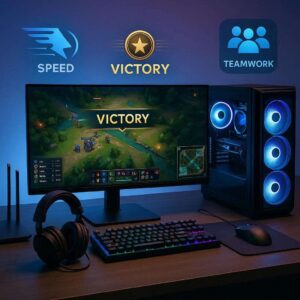 Online gaming is no longer just a casual hobby for many players. It has become a competitive space where skill, timing, teamwork, and the right setup all matter. Whether you play for fun, join ranked matches, or aim to move higher in an online game league, your software and hardware can affect how well you perform. A strong setup will not make every player win right away, but it can remove many problems that hold players back.
Many gamers focus only on practice. Practice is important, but it is not the only factor. A player with poor internet, slow hardware, outdated drivers, or weak settings may struggle even if they understand the game well. Small delays can affect aim, movement, reaction time, and team coordination. In fast online matches, even a short lag can lead to a lost round or a missed chance.
This is why boosting Rocket League performance starts with building a reliable foundation. Your computer, console, internet connection, monitor, headset, mouse, keyboard, controller, and game settings all work together. If one part is weak, it can affect the whole experience.
Hardware is the physical equipment you use to play. This includes your gaming PC, laptop, console, monitor, headset, keyboard, mouse, controller, router, and other devices. In online games, hardware affects speed, clarity, comfort, and control.
A strong processor helps your system handle the game smoothly. The processor, also called the CPU, manages many tasks at once. If it is too slow, your game may freeze, stutter, or load slowly. This can be a serious problem during ranked matches. A better CPU can help the game run with fewer delays, especially when many things happen on screen.
The graphics card, or GPU, is also important. It controls how the game looks and how smoothly the visuals move. A better graphics card can help you get higher frame rates. Frame rate means how many images your screen shows per second. A higher frame rate makes movement look smoother. This helps players react faster and track enemies better.
A good monitor can also support better performance. Many casual players use a standard monitor, but competitive players often choose monitors with higher refresh rates. A 144Hz or 240Hz monitor can show smoother motion than a basic 60Hz screen. This may not replace skill, but it can make aiming, movement, and timing feel more responsive.
Your mouse and keyboard also matter. A gaming mouse with adjustable sensitivity can help you control movement better. A mechanical keyboard can give faster and more reliable key presses. For console players, a comfortable controller with responsive buttons can make long gaming sessions easier.
Audio hardware should not be ignored. A good headset helps players hear footsteps, ability sounds, warnings, and team communication. In many games, sound gives important clues. You may hear where an enemy is coming from before you see them. Clear audio can help you make better decisions during a match.
Internet hardware is also part of your gaming setup. A stable router and wired connection can reduce lag. Wi-Fi may be convenient, but it can be less stable than an Ethernet cable. In online leagues, stable connection matters because every move must reach the game server quickly. If your connection drops or spikes, your actions may happen too late.
Comfort is another factor. A good chair, proper desk height, and clean cable setup can help you stay focused. Competitive gaming often requires long hours of practice. If your body is uncomfortable, your focus can drop. This may lead to poor decisions, slower reactions, or fatigue.
Hardware does not need to be the most expensive to be useful. The goal is to build a setup that is stable, responsive, and comfortable. A balanced setup is better than spending too much on one part while ignoring the others. For example, a powerful gaming PC will not help much if your internet connection is unstable.
Software is just as important as hardware. It includes your operating system, drivers, game settings, security tools, communication apps, and performance software. When software is not managed well, your game may run poorly even on strong hardware.
Drivers are one of the first things to check. Drivers help your hardware communicate with your system. Graphics drivers, audio drivers, and network drivers should be updated when needed. Outdated drivers can cause crashes, lower performance, or connection problems. Keeping them updated can help your system run games better.
Game settings also play a major role. Many players want the best-looking graphics, but high settings can reduce performance. In competitive matches, smooth gameplay is often more important than visual detail. Lowering shadows, effects, motion blur, and unnecessary details can improve frame rate. A cleaner screen can also make it easier to spot enemies and read the match.
Mouse sensitivity and key bindings are also part of software control. Players should choose settings that feel natural and repeatable. If your sensitivity is too high, your aim may become unstable. If it is too low, you may react too slowly. The right setting depends on the game and your play style. Once you find a good setup, it helps to keep it consistent.
Operating system settings can also affect gaming. Background apps can use memory, CPU power, or internet bandwidth. Before serious matches, it helps to close apps that are not needed. Streaming platforms, browser tabs, file downloads, cloud backups, and update tools can slow things down. A clean system gives your game more room to perform well.
Communication software is also important in team games. Apps like Discord or in-game voice chat help players coordinate. Good communication can turn an average team into a stronger one. Players can call out enemy locations, plan attacks, warn teammates, and adjust strategies. Clear voice settings and a good microphone can improve teamwork.
Security software should also be managed carefully. Antivirus tools protect your system, but some can scan files during gameplay and cause slowdowns. You should not turn off protection completely without care, but you can schedule scans outside gaming hours. This helps keep your system safe without hurting performance during matches.
Game launchers and update tools should also be checked. Make sure your game is fully updated before joining important matches. A surprise update before a league session can waste time or cause stress. It is also wise to check patch notes. Game updates can change weapons, characters, maps, and ranking systems. Understanding these changes can help players adapt faster.
Recording and streaming software can affect performance too. Many content creators record matches for review or upload. This can be useful, but it can also use system resources. If your game starts lagging while recording, you may need to adjust recording quality or use hardware encoding.
Software is not only about speed. It also helps with review and learning. Some games offer replay systems, match history, and performance stats. These tools can help players study mistakes. You can see where you died, why a team fight failed, or how your positioning could improve. This kind of review supports long-term growth.
Boosting online game league performance should start with honest review. Players should look at their current setup and identify weak points. Is the game lagging? Is the screen tearing? Is the internet unstable? Are team calls unclear? Are controls uncomfortable? Each problem needs a direct fix.
The first step is checking game performance. Players can monitor frame rate, ping, packet loss, and system usage. Frame rate shows how smoothly the game runs. Ping shows how fast your connection talks to the server. Packet loss means some data is not reaching the server properly. These numbers can reveal whether the problem comes from hardware, software, or internet connection.
Next, players should adjust graphics settings. Competitive settings are usually simple and clean. The goal is not to make the game look cinematic. The goal is to make it clear, smooth, and responsive. Turning off heavy effects can help players focus on what matters during a match.
Internet setup should be checked as well. A wired connection is often better than Wi-Fi. If Wi-Fi is the only option, the router should be placed close to the gaming device. Other users on the same network can also affect performance. Downloads, video streaming, and large uploads can increase lag. Scheduling heavy internet use outside gaming hours can help.
Players should also keep their system clean. This means removing unused apps, updating drivers, checking storage space, and restarting the device before important sessions. A full storage drive can slow down a system. Too many startup apps can also reduce performance. Simple maintenance can make a noticeable difference.
Another important step is creating a practice routine. Software and hardware can support performance, but they cannot replace discipline. Players should practice aim, movement, map knowledge, team communication, and decision-making. They should also review matches to understand what went wrong. A better setup gives players the tools, but improvement still depends on smart practice.
Team-based players should focus on communication. A good headset and clear voice settings can help teams move as one unit. Players should avoid shouting, blaming, or talking too much during matches. Short and useful callouts are better. Good communication helps the team react faster and stay organized.
Comfort should also be part of the plan. Long gaming sessions can cause hand strain, back pain, eye fatigue, and loss of focus. Players should take short breaks, stretch, adjust screen brightness, and sit properly. A comfortable setup helps players stay sharp for longer periods.
It is also important to set realistic goals. Not every player will climb ranks overnight. Online league improvement takes time. Better hardware and software can remove barriers, but players still need patience. Focus on steady progress. Track small wins, such as better aim, fewer mistakes, stronger teamwork, or improved map awareness.
Players who want to boost their online game league results should also stay fair. Competitive games work best when players follow the rules. Avoid cheats, hacks, account sharing, or dishonest tools. These may lead to bans and can damage the gaming community. Real progress comes from better preparation, better practice, and better teamwork.
The best setup is the one that supports your goals. A beginner may only need stable internet, smooth settings, and a decent headset. A serious ranked player may need a higher refresh monitor, better peripherals, and stronger performance tools. A content creator may also need recording software and extra storage. Your setup should match how you play.

Prospecting has always been difficult for small businesses due to their limited budget and personnel, as well as their struggle to pinpoint the exact target to make their outreach efforts worthwhile.
Larger companies have historically dominated the outsourcing market due to their access to advanced digital tools and sophisticated target marketing. In this environment, the entrepreneurial world has seen the development of tools such as the IG email scraper to allow small businesses access to verified lead data to pinpoint their target customers.
Lead generation often consumed innumerable hours of work as prospecting fell to business owners. Prior to digital scraping tools, contact generation was an extremely meticulous process.
Owners would manually browse social media to identify niche audiences and then painstakingly try to collect contact details. In contrast, digital scraping tools available today can gather target information at scale to create clean audience lists in a fraction of the time.
Increased data availability has shifted the customer acquisition process. Small businesses that rely on precise targeting for customer acquisition have drastically reduced the time and effort required to search the platforms. Building customer relationships and testing campaign messages can take up more time.
Automation is integral to the new model of lead generation, as it levels the playing field for businesses. Business owners no longer need to perform repetitive tasks manually, such as gathering and organizing data, as they can use software.
Business owners save time and, more importantly, no longer need to hire costly agencies or additional personnel to maintain an active sales pipeline.
More importantly, automated tools improve consistency. Small businesses face operational challenges when they encounter workload spikes or lack the necessary staff to effectively manage marketing and operational activities.
Businesses can achieve operational consistency through lead scraping technology, which enhances sales forecasting, streamlines sales cycles, and ultimately leads to growth.
ALSO READ: How Top Wikipedia Service Highlights the Balance between Software and Hardware?
The performance of the outreach tools most clearly demonstrates the real results that automated marketing tools and operational consistency generate. When a small business has a clean/scraped list of contacts that fall within a target audience, they receive higher response rates.
Campaigns with clean data deliver fewer bounces, maintain an improved sender reputation, and deliver higher campaign deliverability rates.
Another notable advantage is speed. With no latency, scraping tools autopopulate fresh leads into email, CRM, or advertising systems. Small businesses selling seasonal products or running promotions with tight deadlines can capitalize on these swift processes.
Rather than running the risk of losing potential sales, businesses can respond quickly to market trends and keep their leads from cooling.
The more marketing and sales activities can be automated, the more benefit small businesses will gain from tools that offload repetitive tasks and provide better analytical results. Lead generation is less about having large teams and more about implementing clever technology.
The companies that are the first to adopt these technologies will enjoy more efficient sales systems, better targeted marketing, and improved overall business growth.
What is a CPU?
The Central Processing Unit (CPU) is the main chip in a computer that executes instructions and performs calculations. It’s often called “the brain of the computer” because it controls most operations.
The CPU is the heart of all computation — it takes instructions, processes them rapidly, and runs everything from typing a letter to playing a game.
Input and output devices are hardware components that allow communication between the user and the computer system.
Input Devices: Used to send data to the computer.
Output devices allow the computer to deliver or display results of processed data to the user.
https://www.jasonslater.co.uk
Cooling systems are essential in computers and electronic devices because heat negatively impacts hardware performance, efficiency, and lifespan. Without proper cooling, hardware can overheat, slow down, or fail entirely.
Edge computing is a technology where data processing happens near the data source, such as sensors or IoT devices, rather than sending everything to a centralized cloud or data center.
This approach reduces latency, saves bandwidth, and improves real-time decision-making.
An Operating System (OS) is system software that acts as a bridge between the computer hardware and the user. It manages hardware resources and provides services for computer programs.
The Operating System is the backbone of a computer, coordinating all hardware and software to ensure smooth operation and usability.
What’s the Difference?
Authentication: “Who are you?”
Verifies the identity of a user.
Authorization: “What can you do?”
Determines what an authenticated user is allowed to access or perform
System software is designed to operate, control, and extend the processing capabilities of the computer itself. It acts as a bridge between hardware and user-level software.
System Software Operates and controls hardware
Application Software Performs user-specific tasks
Utility Software Maintains and optimizes the system